LLM configuration
iontos uses language models to do its work: reading sources into the graph, judging whether claims are grounded, resolving hard cases, assisting curation. Which model does which job, at which scope, and paid for by which account, is configured on the LLM Config tab.
It's deliberately three small layers rather than one big form, so that what a model is, how it's paid for, and what it's used for stay separable:
Select a scope, open LLM Config, and you'll find the three as sub-tabs: Types, Instances, Mappings.
Types — what a model is
A Type is a reusable description of a model: its wire protocol, its model alias, its parameters and limits. Types cascade: a Type defined at an organization is available to that organization and — if you choose — its sub-organizations, nearest definition winning.
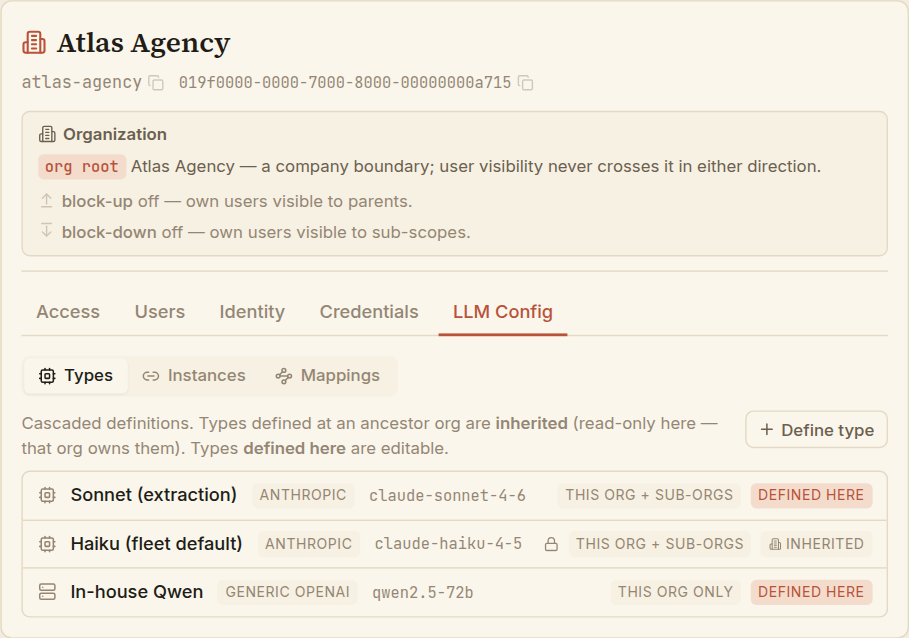
A row tells you where a Type comes from:
- Defined here — defined at this scope; you can edit it.
- Inherited (with a lock) — defined by an ancestor organization and reaching down to here. It's read-only; the organization that owns it manages it.
Define a type
Choose Define type.
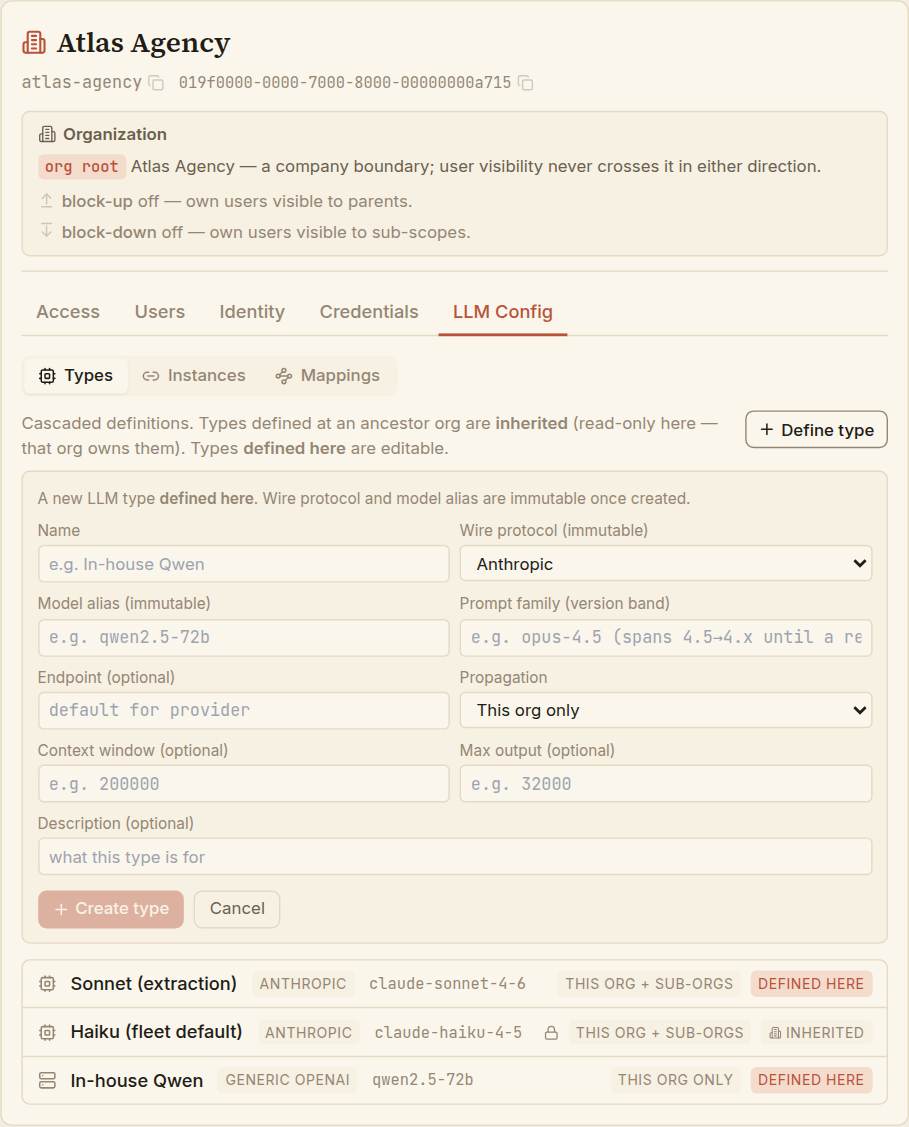
| Field | What it is |
|---|---|
| Name | A label you'll recognise (Sonnet (extraction)). |
| Wire protocol | The API dialect iontos speaks to reach the model: Anthropic, OpenAI, Gemini, or Generic OpenAI (any OpenAI-compatible endpoint iontos doesn't run itself). Immutable once created. |
| Model alias | The provider's model identifier (claude-sonnet-4-6). Immutable once created. |
| Prompt family | A version band the model is pinned to, so prompt behaviour stays stable across minor provider updates. |
| Endpoint | The base URL to call. Optional for the named providers (they have defaults); required for Generic OpenAI. |
| Propagation | This org only, or This org + sub-orgs (cascades down). |
| Context window / Max output | Optional token limits. |
Choose Create type. Because wire protocol and model alias are the model's identity, they can't be changed later — if you picked the wrong one, define a fresh Type rather than trying to mutate it.
Edit a type, and change its reach
Open a defined-here Type and choose Edit to change its name, prompt family, endpoint, limits, or active state. Its wire protocol and model alias show read-only.
Propagation is changed on its own, separately from the other fields — it's a structural change, not an edit. Narrowing a Type's reach (sub-orgs → this org only) withdraws it from the sub-organizations that were relying on it. Widening it (this org → +sub-orgs) pushes it down the tree and requires additional authority beyond ordinary configuration, since it changes what other organizations see.
Instances — a model you can actually call
A Type on its own is just a description. An Instance makes it usable by binding it to a credential — the key that pays for and authorises the calls. Instances are scope-bound, and cost is attributed to the scope that owns them.
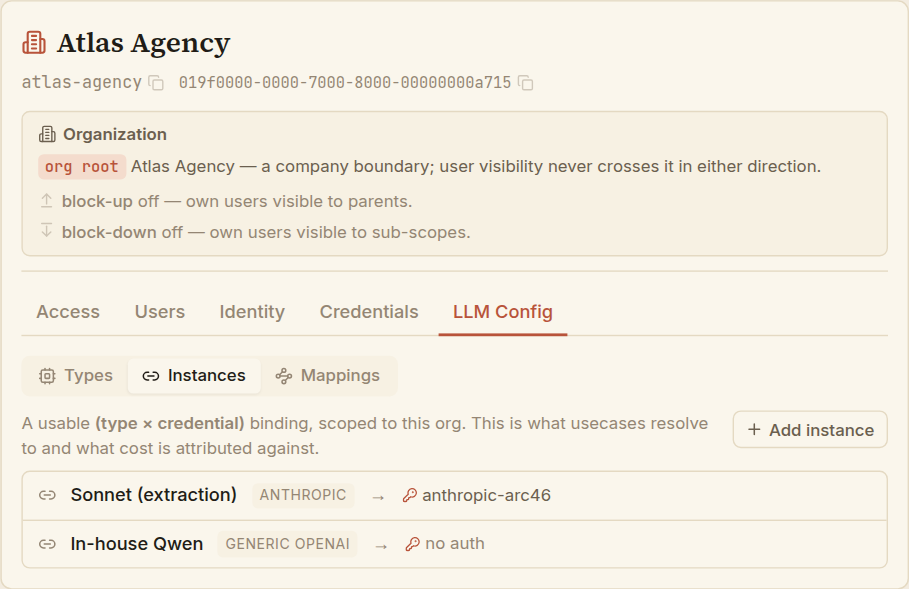
Add an instance
Choose Add instance, pick a Type (any visible here — local or inherited), then choose how it authenticates:
- Use a credential — pick one of the scope's credentials. This is the usual case: a paid provider needs a key. If the scope has none yet, add one on the Credentials tab first.
- No auth — for an open endpoint that needs no key (an internal self-hosted model, say).
Choose Create instance. The credential is referenced by identity, not copied — rotate it and every instance using it keeps working. An instance whose credential is later disabled simply stops working until the key is restored.
This surface only references credentials; it never stores a secret. Authoring, rotating, and disabling keys is the Credentials tab, deliberately kept separate so key material has one home.
Mappings — which model does which job
A Mapping is the routing decision: at this scope, a given task resolves to a given instance. Tasks are a fixed set — a mapping picks the instance, never invents the task.
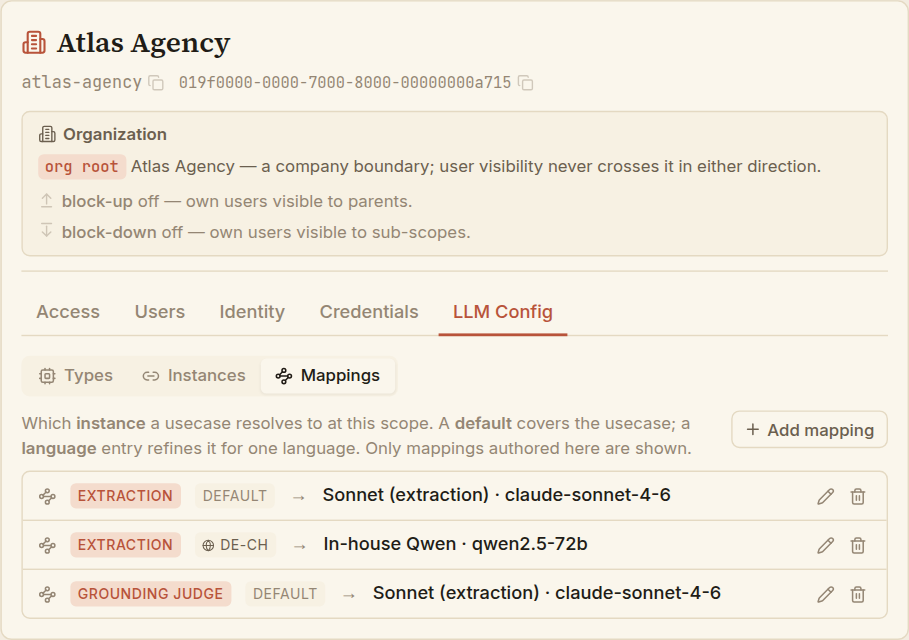
The fixed tasks (usecases) are:
| Usecase | Roughly |
|---|---|
| Extraction | Reading sources into the knowledge graph. |
| Grounding judge | Judging whether a statement is supported by its evidence. |
| Tier-5 resolution | The hardest resolution decisions. |
| Curation | Assisting data-quality review. |
| Query builder | Turning a question into a graph query. |
Add a mapping
Choose Add mapping, pick a usecase and the instance it should resolve to. Leave language empty for the usecase's default; set a language tag (a BCP-47 code such as de-CH) to refine just that language:
- A default mapping (no language) covers the usecase for any language not otherwise refined.
- A language mapping overrides the default for that one language — e.g. route German-Swiss extraction to a model that handles it better, while everything else keeps the default.
Only mappings authored at this scope are listed here — not ones inherited from ancestors. This tab shows what you have set, not the full resolved picture.
Repoint or remove a mapping
- Edit repoints a mapping to a different instance. The usecase-and-language pair is the mapping's identity, so it stays fixed — to change those, delete the mapping and add a new one.
- Delete removes a mapping. You can't delete a usecase's default while it still has language refinements hanging off it — remove the refinements first, so no language is left pointing at a default that's gone.
Because each layer builds on the last, the smooth path is: define a Type → store a Credential → create an Instance → add a Mapping. Each step's picker draws from the one before, so working in this order means every choice you need is already there.