Identity providers
Before anyone can hold access, iontos has to trust how they prove who they are. That trust is an identity provider (IdP) — an OIDC / SSO / OAuth login source. The Identity tab is where you register the providers a scope's people sign in through, and manage them over time.
Two kinds exist, and the difference decides almost everything:
| Kind | Who runs the login | When you use it |
|---|---|---|
| Managed | iontos runs the identity provider and mints the accounts. | The default for people who don't already have a corporate login you want to reuse. |
| External | Your own identity provider (Okta, Entra, Zitadel, any OIDC issuer) owns identity; iontos only validates the tokens it issues. | Bring-your-own-SSO — let people sign in with the accounts they already have. |
Managed instances are set up when the deployment is provisioned. The action you take here is registering an external provider — pointing a scope at an IdP you already run.
The Identity tab
Select a scope and open Identity. It lists the providers usable at this scope — including any registered further up the tree that reach down to here. Each row shows the provider's name, its kind, and its issuer URL; expand one to see its full (non-secret) configuration.
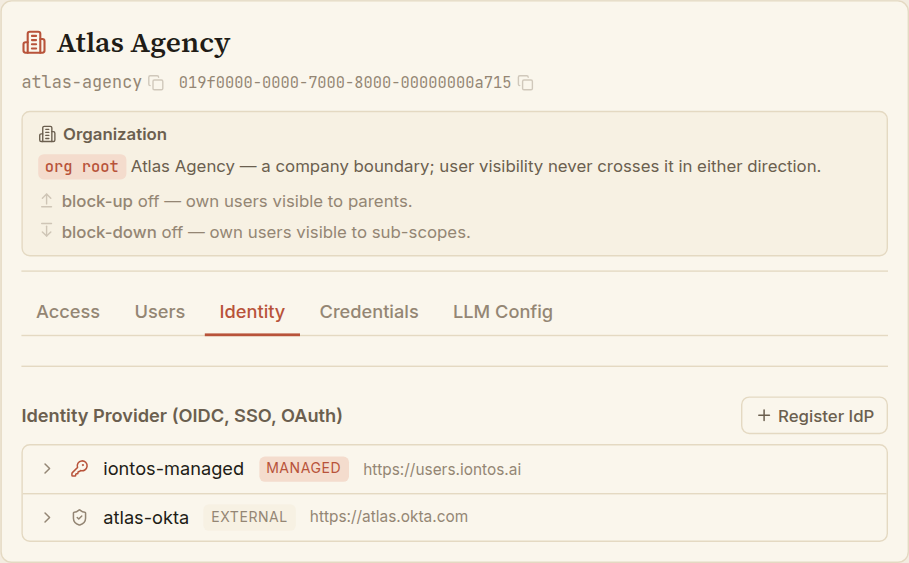
Register an external identity provider
Choose Register IdP, keep the kind on External, and fill in the trust record.
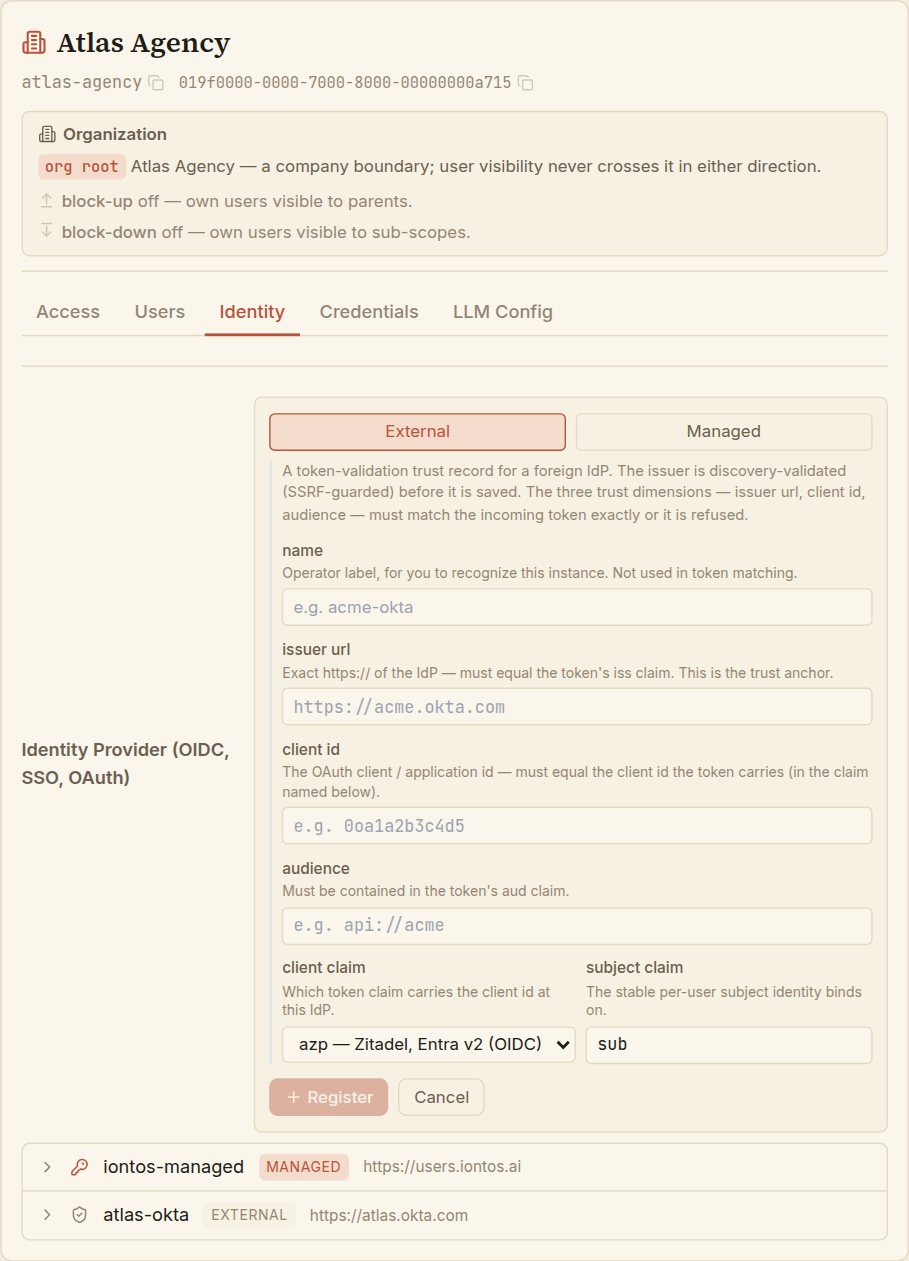
The heart of it is three values that must match every incoming token exactly, or the token is refused. Getting these right is the whole task:
- Name — a label for you to recognise the instance (
atlas-okta). Not used in token matching. - Issuer URL — the provider's exact
https://issuer. This is the trust anchor; it must equal the token's issuer. iontos validates the issuer by discovery before it saves, so a wrong or unreachable URL fails loudly here rather than silently later. - Client ID — the OAuth application id, matched against the client id the token carries.
- Audience — must be present in the token's audience.
- Client claim — which claim your provider puts the client id in. Providers disagree, so the selector names them:
azp(Zitadel, Entra v2),client_id(RFC 9068),cid(Okta, Entrust),appid(Entra v1). Pick the one your IdP uses. - Subject claim — the claim carrying the stable per-user id that grants bind to.
subfor most providers;oidfor Microsoft Entra.
Choose Register. The instance is validated and saved, and becomes selectable when you declare users against it.
Only issuer URL, client id, and audience take part in trusting a token. The name is cosmetic — pick something you'll recognise in a list, and don't agonise over it.
Prepare the application on your side
Registering the instance tells iontos what to trust. The other half of the handshake lives on your own provider: the application entry there has to be set up to send what iontos expects — and this is the half iontos can't do for you. Three settings decide whether the very first sign-in completes.
- Allowed redirect URIs — your provider only sends a person back to a URL you've pre-approved. Add the sign-in callback
https://<your-iontos-host>/auth/callback(the exact host, no trailing slash) and the post-logout URLhttps://<your-iontos-host>/. Miss these and the provider refuses at its own login page — "redirect URI invalid" — before any token is issued, so nothing ever reaches iontos to explain the failure. - Public client, PKCE, no secret — the iontos UI is a public browser client: it holds no secret and can't safely keep one. Set the application's token-endpoint authentication method to None and enable PKCE. If the provider is instead configured to require a secret (Client Secret Post or Basic), the login page appears to succeed and then the code-for-token exchange fails with
invalid_client— confusing precisely because the visible half worked. - The claims the token must carry — iontos matches every token against the trust record you just entered, so the token has to carry those values: the issuer and audience, the client id in whichever claim your provider emits it (the same claim you chose in the client-claim selector above — e.g.
cidfor Entrust), and a stable subject. Includeemailandemail_verifiedas well, so declared users bind to their accounts on first sign-in.
The instance record and your provider's application are the two ends of one trust relationship — iontos checks what it receives, your provider controls what it sends. When a first connection fails, it's almost always one of these three drifting apart, and the error usually surfaces on the provider's side before iontos sees anything at all.
View and edit an instance
Expand any instance to see its full configuration (no secrets are ever shown). For an external instance you administer, two actions appear.
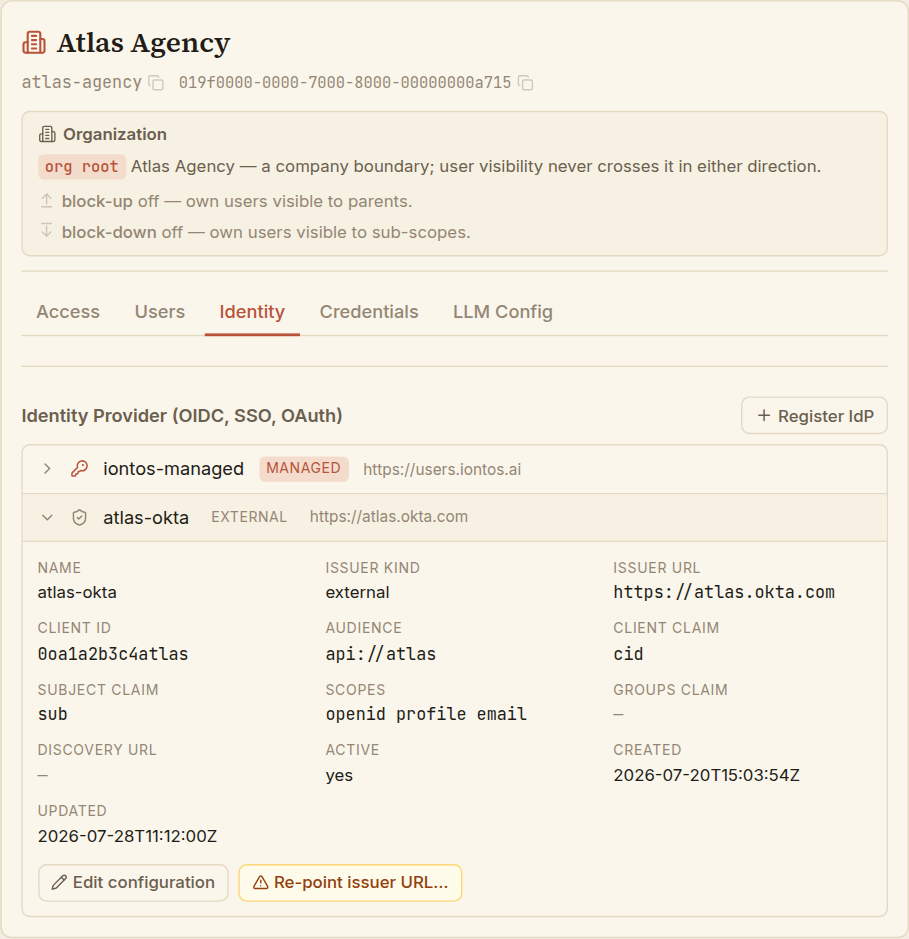
Edit configuration covers the everyday changes. Two groups behave differently, on purpose:
- Name, audience, client claim — matching details you can correct any time. They don't change which person a token resolves to.
- Subject claim, client id — these decide which account a token maps to, so they can only be changed while no one has signed in through the instance yet. Once even one account is bound, they're frozen — changing them would silently re-point existing people. iontos enforces this; the form lets you try, and the server refuses if accounts are bound.
An instance registered higher up the tree can appear here because its trust reaches down, but it can only be edited where it was registered. If you expand such an instance you'll see a note to select its owning scope to manage it — not an error, just a signpost.
Re-pointing the issuer (Owner only)
Changing the issuer URL is a separate, deliberately heavy action — Re-point issuer URL…, offered only to an Owner. The issuer is the trust anchor for every account bound to the instance, so re-pointing it re-points trust for all of them at once, including anyone holding cross-organization access.
The legitimate case is narrow: the same provider tenant moving to a new DNS name. iontos re-validates the new issuer before saving, but it cannot tell a genuine re-home from a switch to a different provider — so the action requires you to type the new URL and explicitly affirm that the re-home is legitimate.
If you point the issuer at a different provider, every bound person now authenticates against that provider — a silent, wholesale change of who is who. Use this only when the same IdP has genuinely moved, and treat it with the seriousness the confirmation asks for.
Managed instances are read-only here
A managed instance — the iontos-run identity provider — shows its configuration for reference but offers no edit or re-point. It's administered at the platform layer, not from a scope's Identity tab, precisely so that the shared login everyone depends on can't be altered from inside one delegated scope. That's a guarantee, not a missing feature.